Background
It’s been 4 years since we deployed our BI tools Superset. We haven’t touched it since, because we are kind of satisfied (more like no major concern) with the current version, especially with our data having relatively low volume. It could display some charts, run some queries, and that’s it. Nothing fancy.
But I think these now become a security risk, not to mention other performance improvements we will get, so I allocated one full working day just to migrate it. Here’s the recap in case anyone in the same position as me.
The Process
Since we can’t just replace the Docker file definition from apache/superset:2.1.0 to apache/superset:6.0.0 (due to not being a direct update, and the risk of destroying our current metadata table), we need to do a sequential upgrade: from 2 to 3 to 4 up to 6.
The thing is, we need not only to update the Docker image, but also our metadata table. Our superset instance is being hosted on ECS, with RDS PostgreSQL as the database. So in this case, we have to duplicate the production database first into development, sequentially update from 2 to 6, pointing to this local database, then after we confirm our migration is done, we move it back (the db and the image) to the production environment. Specifically:
-
Backup/dump the current database production. We need the exact replica of our database production to follow us through migration. We need a server with the same VPC as the database and run:
docker run -it --rm -v $(pwd)/backup postgres:17 pg_dump -h <db-prod-address> -U <user> -d <db> -F c -b -v -f /backup/superset.dump
I’m using docker since I have local installation of postgres, and it’s different version, so it’s much easier to create one run-off container for this. This command will create a file in $(pwd)/backup, a binary dump (compressed).
-
Now copy this file to our dev environment, spin up a new postgre database, and restore this data into that new database. Again, using docker:
docker run -d \
    --name pg_superset \
    -p 5432:5432 \
    -v $(pwd)/backup:/backup \
    -e POSTGRES_DB=<db> \
    -e POSTGRES_USER=<user> \
    -e POSTGRES_PASSWORD=<password> \
    postgres:17
This just will create the database instance. To restore it, use:
docker exec -it pg_superset pg_restore -U <user> -d <db> -v /backup/superset.dump -
Finally the sequential update. For each version, we will build a docker image pointing to this postgre database and run it. The superset image will automatically migrate any current configuration into the latest version. If the progress runs smoothly, we change our Dockerfile, use the next version, and repeat the process. For example, our base Dockerfile (version 2.0.0), we have:
FROM apache/superset:2.1.0

USER root
COPY requirements.txt /app/
RUN pip install -r /app/requirements.txt

COPY superset_config.py /app/
ENV SUPERSET_CONFIG_PATH /app/superset_config.py
...

COPY superset-init.sh /app/superset-init.sh
RUN chmod +x /app/superset-init.sh

USER superset
ENTRYPOINT [ "/app/superset-init.sh" ]
Now, you need two step:
a. Build your image.
docker build -t superset:2.0 .b. Run the superset.
docker run --name superset
    --add-host=host.docker.internal:host-gateway
    -e DATABASE_HOST=host.docker.internal
    -e DATABSE_PORT=5432
    -e DATABASE_DB=superset <other env>
    superset:2.0
Note that we use database host
host.docker.internalto reference our backup postgre.
We repeat the process iteratively, by changing the Dockerfile then running the same command. One thing we note that on version 5.0 forward, there are some changes regarding how Dockerfile for superset is created.
First, Superset using uv to manage their installation. So instead of normal pip, we have to use uv pip install.
Secondly, we now have to move the superset_config.py into a new location: /app/pythonpath/superset_config.py.
So, our Dockerfile for version 5.0 forward would be:
FROM apache/superset:5.0.0
...
COPY requirements.txt /app/requirements.txt
RUN uv pip install --no-cache-dir -r /app/requirements.txt
COPY superset_config.py /app/pythonpath/superset_config.py
...
After confirming (when running using docker run for the latest version), we finally have a Docker image for version 6.0 along with postgre database that is up to date and in sync. The final step would be dumping the data into the postgres:
docker_exec -t -e PGPASSWORD=<password> pg_superset pg_dump -U admin -d <db> > backup_v6.sql
Then, on production, we need to restore this (preferably into a new database), then deploy the latest image (version 6) pointing to this new database.
The Result
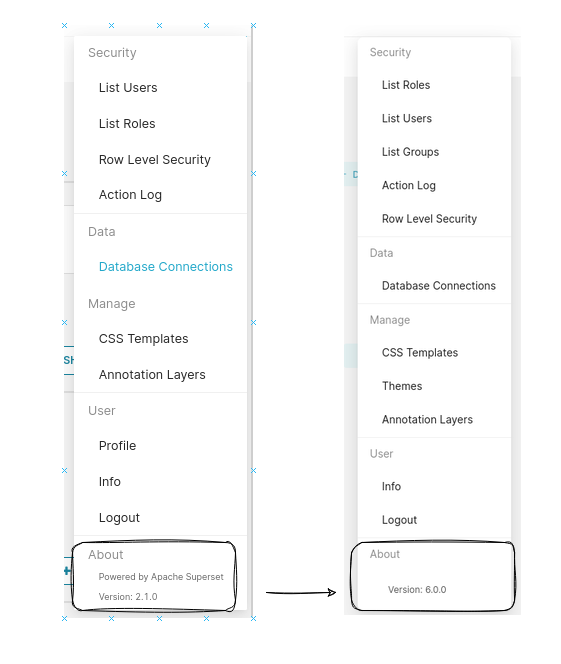
A successful grunt work.